
How Add-On Menus Work
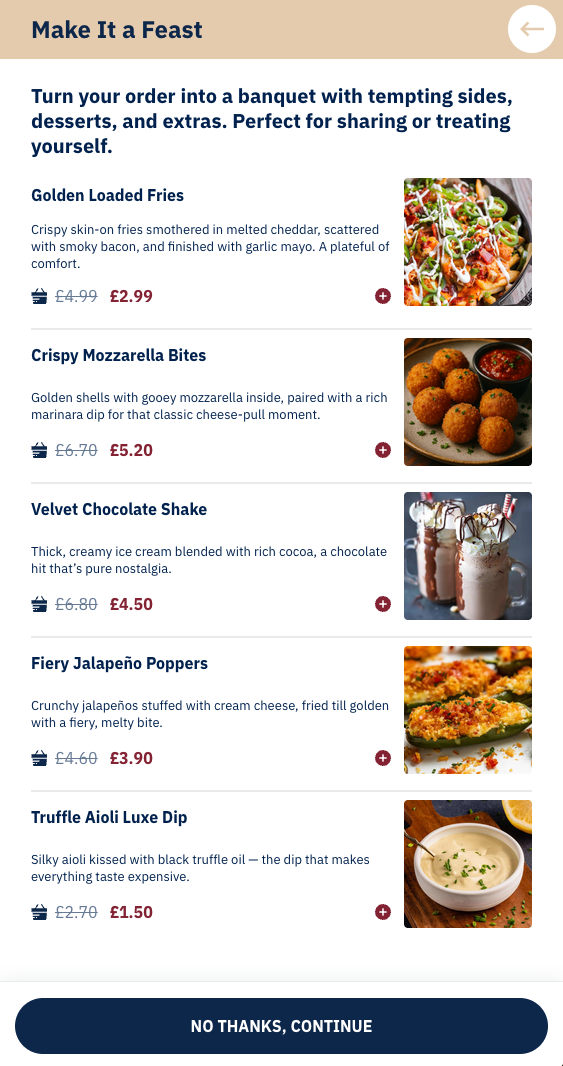
When a customer’s basket reaches a set minimum spend threshold, Add-On Sale Menus appear at the final stage of checkout. These menus give customers the option to add a small, curated selection of extra items, often at discounted prices. Each item has both a gross price (its usual cost) and a minimum purchase price (the add-on price). Businesses control which items appear and at what basket value the menu is triggered. Customers can skip the menus if they choose, but when designed well, it works as a last‑minute nudge to boost order value without disrupting existing offers or discounts.
Advanced Add-on Menu Strategies
Updates to this feature are included in Release 8.0.3
Add-on Menus now support additional controls that allow you to tailor the checkout experience more precisely. These features make it possible to reward higher-spending customers, reduce choice overload, and protect margins on premium or limited items.
Using Multiple Add-on Menus
Multiple add-on menus are supported by Mobile App 6.1.2+
Add-on
You can now create multiple Add-on Menus for a single business. Each menu can be configured independently, allowing you to design tiered or segmented add-on experiences.
Common use cases include:
-
Tiered spend incentives: Offer one menu at a lower spend threshold and unlock more premium add-ons as basket value increases.
-
Menu separation: Keep drinks, desserts, and premium extras in separate menus rather than combining everything into one.
This approach encourages customers to spend a little more in order to access better or more exclusive add-ons.
Setting Different Minimum Basket Values Per Menu
Each Add-on Menu has its own minimum basket value. This allows menus to appear only when the customer’s spend reaches a level that makes sense for the items being offered.
For example:
-
A £15 minimum menu offering dips, sides, or soft drinks.
-
A £30 minimum menu offering desserts or sharer items.
-
A £40+ minimum menu offering premium items or bundled treats.
Using graduated thresholds helps avoid undercutting your margins while still encouraging incremental spend.
Controlling Which Menus Customers See
By default, customers will see each Add-on Menu they qualify for, shown in turn during checkout. This works well when you want to offer variety and give customers multiple opportunities to add extras as their basket value increases.
Alternatively, you can choose to show only the highest qualifying Add-on Menu. This creates a simpler, more focused checkout experience and is particularly useful when menus are tiered or mutually exclusive.
This approach works especially well when offering free items. For example:
-
Menu 1: Free mini garlic bread on orders over £10
-
Menu 2: Free medium cheesy garlic bread on orders over £15
-
Menu 3: Free large tomato and cheese garlic bread on orders over £20
In this scenario, you would typically want the customer to receive one free garlic bread, based on the highest spend they qualify for, rather than multiple free items. Enabling the option to show only the highest qualifying Add-on Menu ensures the correct offer is applied and avoids unintended giveaways.
Using Quantity Limits to Protect Margin and Stock
Quantity limits can now be applied at two levels:
-
Menu-level limits: Set a maximum number of add-on items that can be selected from the menu overall.
-
Item-level limits: Set a maximum quantity for individual items within the menu.
This allows you to:
-
Prevent customers from overloading discounted items.
-
Limit high-cost or limited-availability products.
-
Encourage variety rather than bulk selection of a single item.
Example: Allow up to 3 add-on items in total, but restrict a premium dessert to 1 per order.
This approach also works well for free‑item menus where you want to offer customers a choice, while still limiting them to a single free item.
For example, a Free Kids’ Meal add‑on menu might include three different meal options. By setting the maximum number of items allowed from the menu to 1, you can present multiple choices without risking multiple free items being added to the same order. This ensures each customer receives just one free kids' meal, while still giving them control over which option they choose.
Add-on Menus That Perform Well
When using these advanced controls, aim to keep the checkout experience simple and intentional:
-
Use lower thresholds for impulse-friendly extras.
-
Reserve higher thresholds for premium or indulgent items.
-
Keep menus small and curated rather than exhaustive.
-
Test different configurations and review performance regularly.
Well-designed Add-on Menus feel like a reward for spending more, not a hard sell, and these features give you the tools to strike that balance.
Minimum Basket Value
When setting the minimum basket threshold for your add‑on menu, look closely at your outlet’s average basket value and the minimum basket for delivery/collection. The add‑on menu should only appear when the spend is high enough to encourage a meaningful basket increase, without being so low that customers would have qualified anyway.
Offering Free Items
Add-on menus also support free items, but these should be used carefully. Free items should be limited to one per basket to avoid giving away too much. When offering a free item, make sure the minimum basket value is set high enough to comfortably cover its cost. Free items can be a smart way to test interest in a new product or drive awareness of something you want customers to try, giving a taste today that could become a paid favourite tomorrow.
What to Offer at Checkout, and What to Avoid
Add-on menus are designed to nudge customers with tempting extras at the very end of checkout. The goal is to increase basket value without cannibalising what’s already been ordered. Avoid discounting staple items that customers are likely to have already added, focus instead on indulgent, premium, or “forgotten” extras that feel like small upgrades or treats.
Industry research shows that sweet treats, fried or carb-heavy indulgences, premium sides, and sauces/dips consistently perform well when offered at checkout.
Suggested Items by Takeaway Type
The following lists provide ideas tailored to typical takeaway categories. These are not exhaustive menus, but examples of what tends to work well in each cuisine type. Use them as inspiration to shape your own add-on offers.
Pizza
|
Offer |
Avoid |
|---|---|
|
|
Curry / Indian
|
Offer |
Avoid |
|---|---|
|
|
Burger / Grill
|
Offer |
Avoid |
|---|---|
|
|
Fried Chicken
|
Offer |
Avoid |
|---|---|
|
|
Universal Best Practice
-
Keep it craveable: fried, cheesy, saucy, or sweet.
-
Keep it quick: avoid anything that slows prep or extends delivery times.
-
Keep it different: offer items customers don’t already have in the basket.
Add-On Menu Name Shortlist
These suggested menu names are designed to hint at indulgence, abundance, or a finishing touch, subtle cues that encourage customers to treat themselves. A good name should feel inviting, spark appetite, and make the add-on menu feel like a natural upgrade rather than an upsell.
-
Tasty Extras
-
Premium Sides
-
Room for More
-
Meal Boosters
-
Sweet Treats
-
Extra Bites
-
Make It a Feast
-
Final Touches
-
Checkout Specials
-
Little Luxuries